Case Timeline
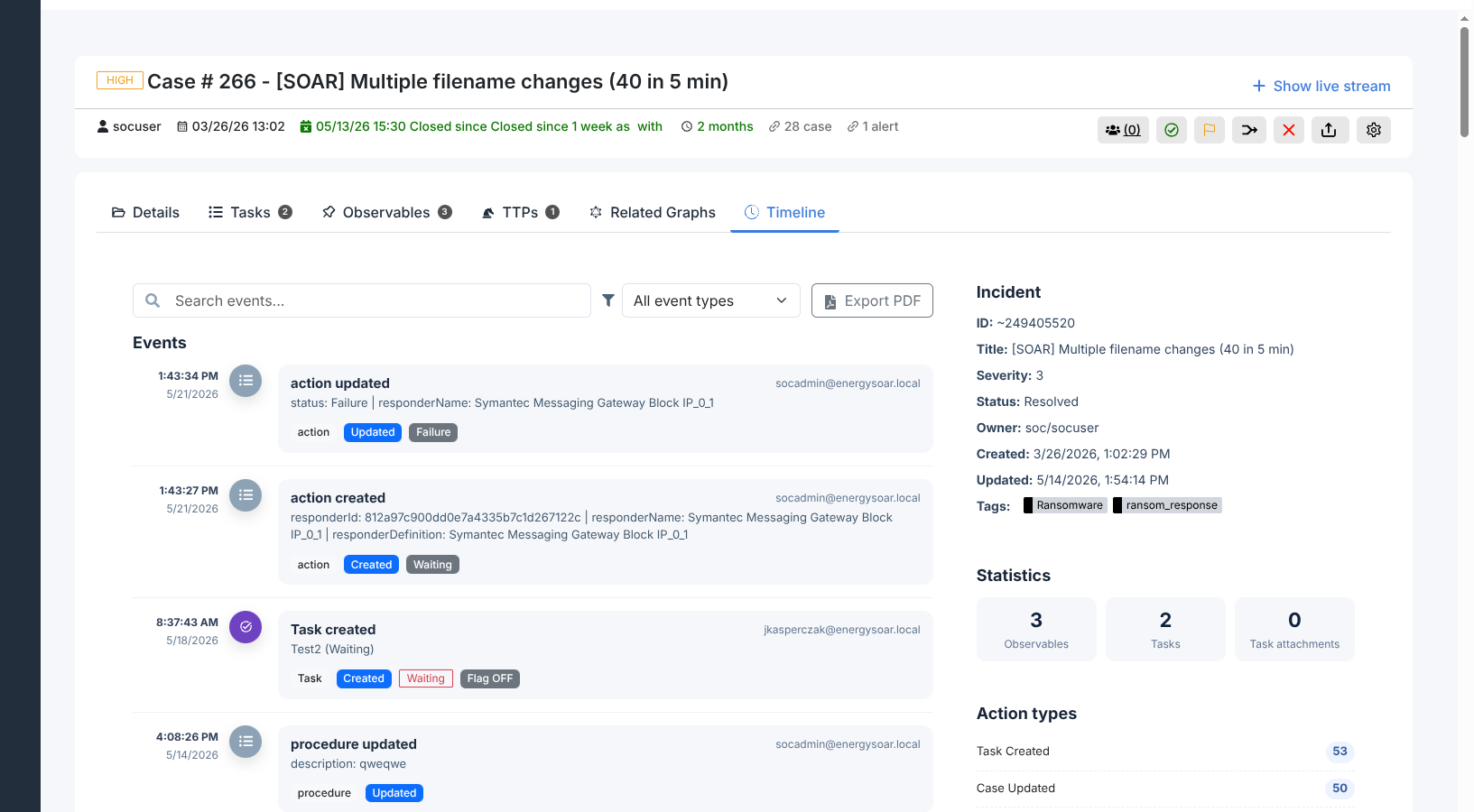
The Timeline tab shows a reverse-chronological audit log of every event that occurred within the case. Each entry records the timestamp, the event type, the user who performed the action, and event-specific details.
Event categories
Five categories of events appear in the timeline:
Category |
What it covers |
|---|---|
Case |
Case created or any case field updated (title, severity, TLP, PAP, assignee, tags, description). |
Task |
Task created, assigned, or its status changed. |
Observable |
Observable added or updated within the case. |
procedure |
ATT&CK procedure added or updated. |
action |
Responder action created, completed, or failed, including the outcome status. |
Filtering and searching
The toolbar provides two controls:
Search — type a keyword to filter entries by their content. Matches on user names, field names, and event details.
Event type filter — show only one category of events. Select Case, Task, Observable, procedure, or action to isolate that category.
Right-hand panel
The panel on the right of the timeline shows:
Incident metadata: severity, status, owner, and tags.
Observable and task counts for the case.
A count of events per category, updated as filters are applied.
Exporting the timeline
Click Export PDF in the toolbar to download the full timeline as a PDF report. The PDF includes all events visible in the current filter view and can be attached to incident reports or forwarded to management.